Mac Portrait Mode in Google Meet on Safari
· Updated

Quick answer: On a supported Mac, start your camera in Google Meet, click the Video button in the macOS menu bar, and turn on Portrait. In macOS Ventura, open Control Center → Video Effects → Portrait instead. You can also use Google Meet's own Blur control in Safari 16.4 or later.
Turn on Apple's Portrait mode
- Open Google Meet in Safari and start the camera in a meeting or its pre-join preview. Allow Safari to access the camera if asked.
- On macOS Sonoma 14 or later, click the Video button in the Mac menu bar and choose Portrait. Click the arrow beside Portrait to adjust the blur amount.
- On macOS Ventura 13, open Control Center in the menu bar, choose Video Effects, then Portrait.
- Check your Meet preview. Turn Portrait off from the same macOS menu when you no longer want the blur.
Apple's current video-effects guide says Portrait requires a Mac laptop with Apple silicon using its built-in camera, or a Mac using Continuity Camera with an iPhone XR or later. The Video menu appears while a compatible app is actively using the camera. Available controls depend on the selected camera, Mac, and macOS version.
Use Google Meet's own blur instead
If Apple's Portrait control is absent, try Meet's built-in blur. Before joining, click Blur at the bottom right of your video preview. During a meeting, open Video settings → Backgrounds and effects → Backgrounds, then choose a blur level. Google's current requirements list Safari 16.4 or later, though effects can vary by device, account, and administrator settings.
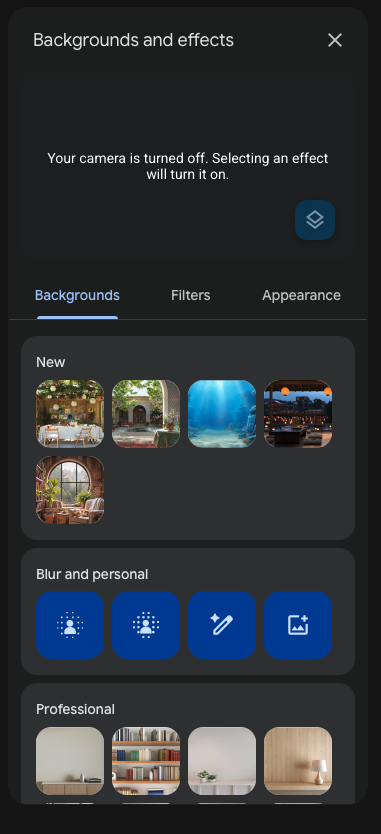
Use one blur effect at a time and inspect the final Meet preview. Stacking Meet blur with Apple's Portrait mode can make the edge around your face look unnatural.
If Portrait is missing
- Start the camera first: the macOS Video button appears only while a compatible app is using it.
- Check the selected camera against Apple's Portrait requirements. An unsupported external or virtual camera may not show Apple's Portrait control.
- If you are using macOS Ventura, look under Control Center → Video Effects, not the newer menu-bar Video button.
- Check that Safari has camera permission in System Settings → Privacy & Security → Camera.
When Xamera is worth adding
Apple's Portrait and Meet's blur handle a simple background. Xamera is useful when you also want adjustable background effects, beauty filters, full-frame color looks, or privacy controls in the same camera feed. The comparison below shows Xamera's Face Studio beauty adjustments, not Portrait blur.
Set up Xamera's camera extension, adjust the feed, and select Xamera in Meet. Face Studio offers separate controls for skin, teeth, face shape, eyes, nose, and lips. Xamera requires an Apple-silicon Mac running macOS 15.5 or later; do not rely on Apple's Portrait control being available when a virtual camera is selected. Check the final Meet preview, and use the Xamera setup guide if the camera is missing.

Frequently asked questions
Does Google Meet support background blur in Safari?
Yes. Google lists Safari 16.4 or later for Meet visual effects on a computer. Availability still depends on device, account, and administrator settings.
Why is Portrait missing from the Mac Video menu?
The camera must be active, and Apple's Portrait mode requires a supported Mac and camera combination. Check the selected camera and macOS version, then try Meet's own blur if Portrait is unavailable.
Is Xamera required for Portrait mode?
No. Apple's Portrait mode and Meet's own blur can work without Xamera. Xamera is an option when you want separate background controls, beauty filters, or other camera effects.
If you liked this tutorial, check out Xamera Camera for macOS.