Xamera Face Studio
Beauty filters for Mac video calls
Xamera adds a set of separate, real-time beauty controls to your Mac camera. Adjust only the areas you want, check the result in Xamera, then use the finished feed in FaceTime or a supported conferencing or streaming app.

Product and platform information reviewed September 24, 2026.
See the adjustment on the same shot
The comparison uses the same recording on both sides. Drag the divider to judge the overall result instead of relying on a staged still image.
What Face Studio lets you adjust
Each area has its own control, so you can keep changes restrained instead of applying one generic touch-up effect.
Skin smoothing
Control skin smoothing independently from the other adjustments.
Teeth whitening
Adjust teeth whitening without changing the rest of the image.
Face shape
Fine-tune face-shape adjustment with a dedicated control.
Eyes
Adjust the appearance of the eyes separately.
Nose
Use an independent control for nose adjustment.
Lips
Adjust the appearance of the lips separately.
How to use beauty filters in a Mac video call
- 1Download and open Xamera on a compatible Apple-silicon Mac.
- 2Choose your physical camera and complete the Xamera camera-extension setup.
- 3Open Face Studio, make your adjustments, and review the Xamera preview.
- 4In FaceTime or your conferencing app, select Xamera as the camera source.
Using Face Studio in FaceTime
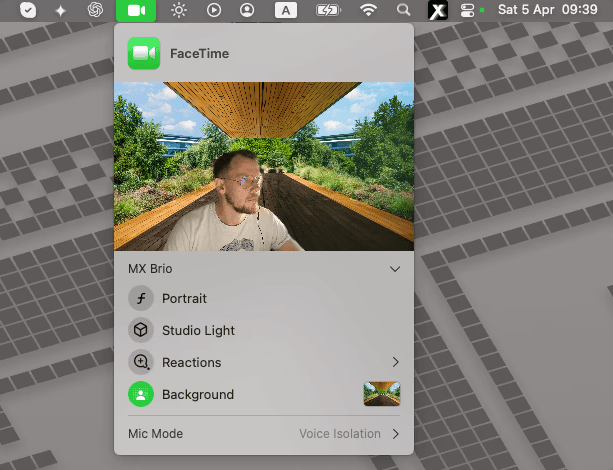
FaceTime has built-in Portrait blur, Studio Light, and other video effects, but no separate controls for skin, teeth, or face shape. Set those in Xamera's Face Studio, then send the finished feed to FaceTime.
- Adjust Face Studio in Xamera and check its preview.
- Open FaceTime, start a video call, and choose Xamera from FaceTime's Video menu.
- Check your FaceTime preview. If you also use Apple's background effects, keep only the combination that looks natural.
This setup is for FaceTime on a compatible Mac. It does not add Xamera controls to FaceTime on iPhone, and Xamera must be enabled before it appears as a choice.
Works through a selectable camera source
Xamera currently supports FaceTime, Google Meet, Zoom, Microsoft Teams, OBS. The destination app must let you choose a camera source.
How Xamera compares with other Mac virtual camerasBeauty processing stays on your Mac
Face Studio processes camera frames locally on your Mac. Your camera feed is not uploaded for beauty-filter processing.
What to know before an important call
- Xamera requires Apple silicon and macOS 15.5 or later.
- The destination app must provide a camera picker so you can select Xamera.
- Results vary with lighting, camera quality, framing, and how clearly your face is visible.
- Face Studio relies on face tracking. Face Shield helps during temporary tracking loss, but you should still check the final preview.
Beauty-filter questions
Can I use Xamera beauty filters in FaceTime?
Yes. Complete the Xamera camera-extension setup, configure Face Studio, then choose Xamera from FaceTime's Video menu.
Does FaceTime have built-in beauty filters on Mac?
FaceTime includes effects such as Portrait and Studio Light, but not separate skin, teeth, or face-shape controls. Xamera Face Studio provides those controls through a selectable Mac camera feed.
Which beauty controls are included?
Face Studio includes separate controls for skin smoothing, teeth whitening, face shape, eyes, nose, and lips.
Does Xamera upload my camera feed?
No. Xamera processes Face Studio effects locally on your Mac rather than uploading camera frames for effect processing.
Why can beauty-filter results vary?
Face tracking and the visible result depend on lighting, camera quality, framing, and whether your face is clearly visible. Review the preview before an important call.
Try Face Studio on your Mac
Start with small adjustments, check them in the destination app, and keep only the changes that look natural to you.