FaceTime Filters on Mac: How to Add Effects and Beauty Filters
· Updated
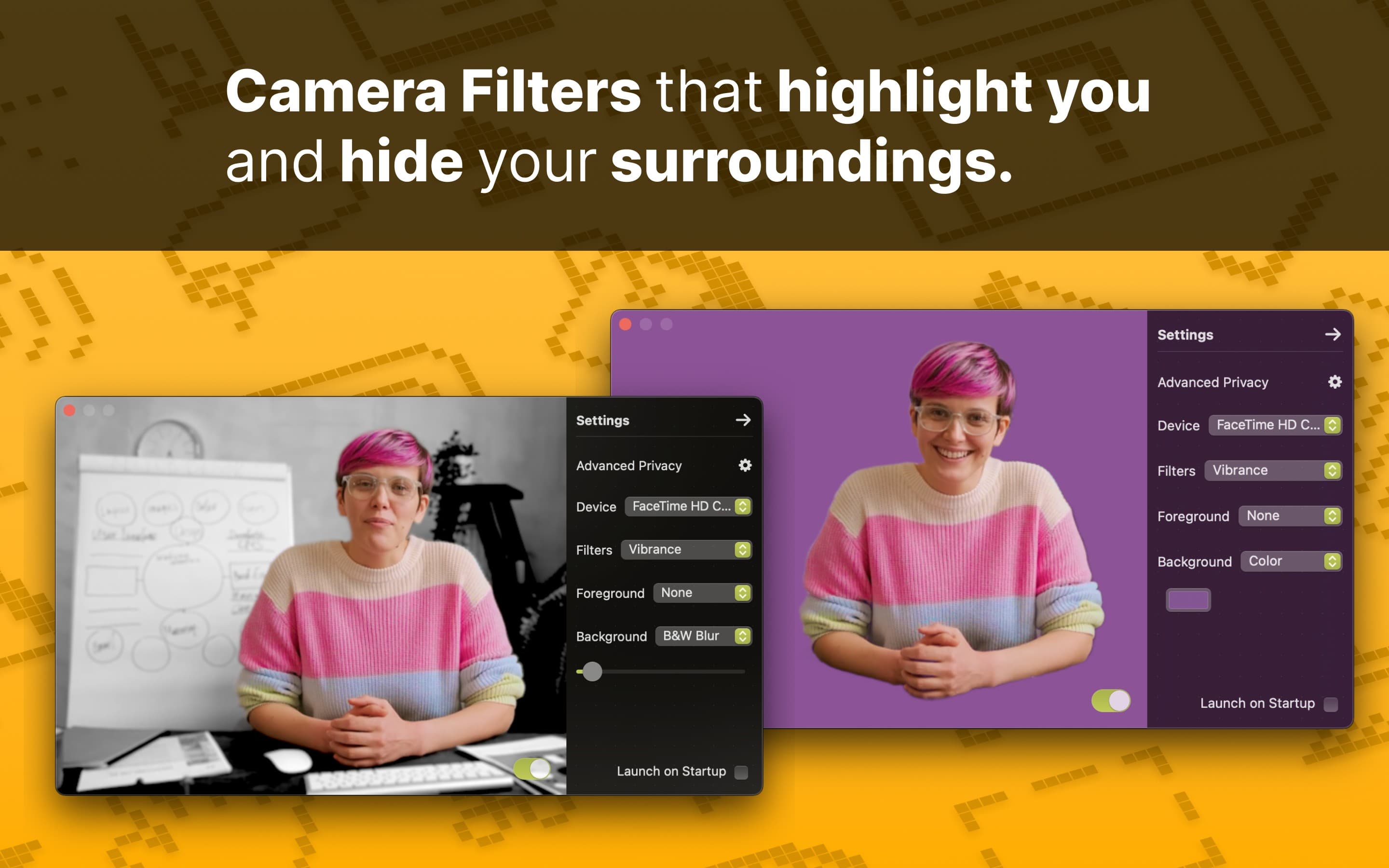
Quick answer: FaceTime on Mac has video effects, not photo-style filters. During a video call, click the Video button in the menu bar and choose Portrait, Studio Light, Edge Light, Center Stage, Reactions, or Background. FaceTime has no color filters or beauty filters. To add those, select a virtual camera such as Xamera Camera from the same menu.

Does FaceTime have filters on Mac?
Not in the Snapchat or Instagram sense. FaceTime for Mac has no library of color filters, stickers, or beauty filters. Its built-in effects change lighting, background, and framing:
- Portrait blurs the background.
- Studio Light dims the background and brightens your face.
- Edge Light lights the edges of your screen like a soft fill light.
- Center Stage keeps you centered as you move.
- Reactions add animated effects such as hearts, balloons, and confetti.
- Background replaces the background with a color, a built-in image, or your own photo.
For skin smoothing or a full-frame color look, you need a separate app that FaceTime can use as its camera. The beauty-filter steps below show how.
Use FaceTime's built-in camera effects
- Open FaceTime and start or join a video call.
- Click your own video tile or the Video button in the menu bar.
- Select Portrait, Studio Light, Edge Light, Center Stage, Reactions, or Background.
- Use the arrow beside an effect to adjust it, or click the active effect again to turn it off.
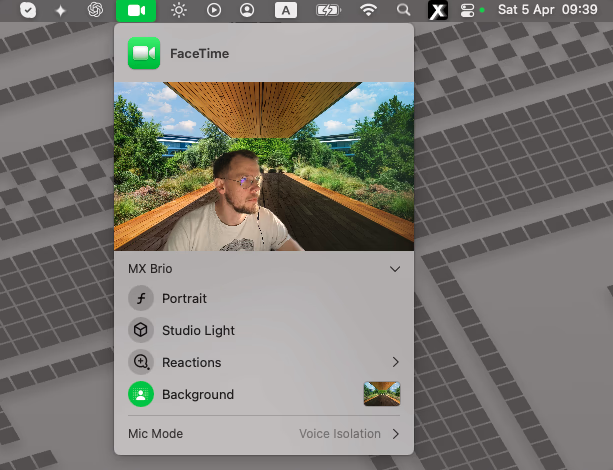
Each effect has its own requirements. According to Apple's video-effects guide:
- Portrait: a Mac laptop with Apple silicon using its built-in camera, or Continuity Camera with iPhone XR or later.
- Studio Light: macOS Sonoma 14 or later on a Mac laptop with Apple silicon, or Continuity Camera with iPhone 12 or later.
- Reactions: macOS Sonoma 14 or later on a Mac with Apple silicon, or Continuity Camera with iPhone 12 or later.
- Background: macOS Sequoia 15 or later on a Mac with Apple silicon, or Continuity Camera with iOS 18 or later.
- Edge Light: macOS Tahoe 26.2 or later on a Mac with Apple silicon. It works with the built-in camera, Continuity Camera, or an external camera (Apple's Edge Light guide).
If an option is missing, check your Mac model, your macOS version, and which camera FaceTime is using.
How to add a beauty filter to FaceTime on Mac
FaceTime has no skin, teeth, or face-shape controls, so a beauty filter has to be applied before the video reaches FaceTime. Xamera Face Studio gives you separate controls for skin smoothing, teeth whitening, face shape, eyes, nose, and lips.
- Install Xamera on an Apple-silicon Mac running macOS 15.5 or later, then complete its camera-extension setup.
- In Xamera, choose your camera and open Face Studio.
- Adjust only the areas you want, and keep each change small.
- Open FaceTime, start a call, then choose Video → Xamera Camera from the menu bar.
- Check the FaceTime preview before the call matters.
The same Xamera Camera feed can also carry full-frame color looks such as Golden Hour, Vintage, Vivid, Mono, Noir, and Sepia. It also has image controls for brightness, exposure, contrast, and saturation, plus background blur, color, or image replacement. If Xamera Camera is not listed, see the installation guide.
Avoid stacking two effects that do the same job. For example, don't combine FaceTime's Background with Xamera's background replacement: the edges around your hair and shoulders can look unnatural. For advice beyond filters, such as light, camera height, and framing, see how to look good on FaceTime on a Mac.
FaceTime filters on iPhone in iOS 26
If you're searching because filters disappeared from FaceTime on your iPhone, the change is on Apple's side. In iOS 26, FaceTime on iPhone no longer shows the Effects panel that held filters, stickers, text labels, and shapes. Memoji and reactions remain. SlashGear and many Apple Community threads reported the removal. If your iPhone runs a later version, check Apple's current iPhone guide for FaceTime.
Xamera runs only on Mac, so it can't restore iPhone filters. On a Mac, the steps above still work.
If an effect or camera is missing
- Video button: Start an active FaceTime video call and make sure the camera is on. The Video menu only appears while an app is using the camera.
- Built-in effect: Check your Mac model, macOS version, and selected camera against the requirements above.
- Xamera Camera: Complete Xamera's camera-extension setup, then quit and reopen FaceTime.
- Wrong camera: Choose the camera at the top of the Video menu. The same menu lists a connected iPhone when you use Continuity Camera.
For permissions, framing, and the camera settings macOS does and doesn't offer, see Mac camera settings.
Frequently asked questions
Can you put a filter on FaceTime on a Mac?
Yes, with limits. FaceTime has built-in blur, lighting, framing, reactions, and background effects. For beauty filters and full-frame color looks, select a virtual camera such as Xamera in FaceTime's Video menu.
Does FaceTime have beauty filters on Mac?
No. FaceTime's built-in effects have no dedicated skin, teeth, or face-shape controls. On a compatible Mac, set those in Xamera Face Studio, then choose Xamera Camera from FaceTime's Video menu.
Which MacBooks have camera effects and face filters?
No Mac has Snapchat-style face filters built in. Apple's video effects depend on the model. Portrait and Studio Light need a Mac laptop with Apple silicon (M1 or later) using its built-in camera. Reactions and Background need a Mac with Apple silicon, and Edge Light also needs macOS Tahoe 26.2 or later. On an Intel or desktop Mac, an iPhone used through Continuity Camera can add Portrait and Studio Light. Beauty filters with Xamera need an Apple-silicon Mac running macOS 15.5 or later.
Can you use Snapchat filters on FaceTime?
Not on a Mac today. The Snap Camera desktop app shut down on January 25, 2023. Snapchat's current Chrome extension adds Lenses only to supported websites in Chrome, not to FaceTime. See what happened to Snap Camera for the options that still work.
How do you blur your background on FaceTime on a Mac?
During a call, click Video in the menu bar and choose Portrait. Drag the slider to change how strong the blur is. Portrait needs a Mac laptop with Apple silicon using its built-in camera, or Continuity Camera with a supported iPhone.
Can you change the FaceTime background on Mac?
Yes, on a Mac with Apple silicon running macOS Sequoia 15 or later. During a call, open the Video menu, choose Background, and select a color, a built-in image, or your own image. A supported iPhone can also provide the feature through Continuity Camera.
Why did FaceTime filters disappear on my iPhone?
In iOS 26, Apple removed FaceTime's Effects panel with filters, stickers, and text labels on iPhone. Memoji and reactions are still available. This doesn't change FaceTime on Mac, where effects are in the Video menu in the menu bar.
Why are FaceTime effects not showing?
The camera must be active, and each effect has its own hardware and software requirements. Start a video call, open the Video menu, and confirm that FaceTime is using a supported camera.
How do you turn off FaceTime hand reactions?
During a call, click the Video button in the menu bar and turn off Reactions. This stops supported hand gestures from triggering animated effects.
If you liked this tutorial, check out Xamera Camera for macOS.